The platform
One pipeline for every security log: collected once, recognised and understood on arrival, shaped to what each tool needs, stored safely, and delivered anywhere.
Collect
Everything you already send, and the services you can't install an agent on.
- Agents
- Windows Event Log; files and the systemd journal on Linux; the macOS unified log, Endpoint Security and audit trail. Installed and upgraded from the console, with an encrypted spool for what can't be read twice.
- Standard protocols
- Syslog over UDP, TCP or TLS; Windows Event Forwarding; GELF; NetFlow and IPFIX; Splunk HEC; Elasticsearch bulk; OpenTelemetry logs and metrics; Prometheus remote write; InfluxDB; StatsD; SNMP traps, v3 included.
- Vendor APIs
- 88 collectors pull from services such as Okta, Microsoft 365, Entra ID, CrowdStrike Falcon, Google Workspace, GitHub, Salesforce and Snyk, keeping their place across restarts.
- Streams, storage and connectors
- Kafka, Amazon MSK, Azure Event Hubs and Confluent Cloud; Amazon S3 through SQS notifications, including Amazon Security Lake's Parquet files; Google Cloud Pub/Sub. Connectors add a source or destination Mainline doesn't have built in.
Recognise and understand
Each event is identified as it arrives, and its message is understood, so nobody has to tag sources or decode log lines by hand.
- 329 source types
- Firewalls, endpoints, identity providers, cloud audit logs, databases, web servers and more, each matched by its content. Any well-formed syslog line is recognised whatever its program, and common application formats (Go, Java, Python, logfmt, JSON) are read with their fields.
- The log dictionary
- Well-known messages, from TLS handshake errors and failed SSH logins to out-of-memory kills, firewall drops and the Windows events that matter: what each means, its usual causes, what to do, and whether it matters for security.
- Explain a log line
- Paste any line, or open any event in Search, to see how it was sent, its format, its fields and what it means.
- Mapping libraries per fleet
- Add your own mappings for one fleet or all of them. Unrecognised events are grouped and shown, and AI assistance, with your own model, drafts a mapping from them for you to review.
Shape
Send each tool what it needs, and not what it doesn't.
- Each SIEM's own schema
- Events written in Splunk's CIM, Microsoft Sentinel's ASIM or Elastic's ECS, or OCSF for the tools that take it, chosen per destination, always keeping the event as received. Sourcetypes, indexes, tables and data streams set for each.
- A visual pipeline editor
- Work on real events: click a field to remove, rename, hash or mask it, and each step shows exactly what it changed. A shared chain for every destination, plus one branch for each.
- Volume reduction and quotas
- Drop, sample and deduplicate by rule, per destination, with a report of what each rule saved; daily caps per fleet keep a runaway source from running up a bill.
- Masking
- Remove or mask sensitive values, such as account numbers or personal data, before they leave the relay.
Detect and enrich
Context and detection on every event, before any SIEM sees it.
- Sigma rules
- Import Sigma rules, your own or SigmaHQ's community set, and relays run each on the log sources it names, from Windows process creation to Linux, cloud audit logs and proxies, including rules that count over time, which carry on across restarts. Matches are labelled on the event, sent where you choose and alerted on, and any rule can be turned into a Splunk, Microsoft Sentinel or Elasticsearch query.
- Threat intelligence matching
- Addresses, domains, URLs, file hashes and CVE IDs checked against indicators from your feeds and lists. Subdomains and ranges match too.
- Feeds and your own lists
- abuse.ch, MISP, AlienVault OTX, Anomali, Recorded Future and CISA KEV, shared with every relay; upload or paste your own.
- Location and network owner
- Country, region, city and network owner for public addresses, from MaxMind-format databases you supply. Nothing is looked up online.
- Your own context
- Tables keyed by IP range, host or user add department, owner and criticality to every matching event.
Deliver
Every destination gets its events, even when it was down for a while.
- 50 destinations
- SIEMs, log platforms, data warehouses and object storage, from Splunk, Sentinel and QRadar to Snowflake, BigQuery and S3.
- Durable by design
- Events are written to the relay's store before delivery, and backlogs drain in order when destinations return.
- Relay groups
- Up to five relays share a fleet's work. If the active one stops, another takes over with everything it had copied, repeating at most the last few seconds of deliveries.
- Replay and backfill
- Send history from the relays' store or your archive to any destination, by source and time range, or just the events a search found.
- A searchable archive
- Keep everything in your own object storage as OCSF records in Parquet, the open formats data lakes read. Searches read only the files that can match, so months of history stay cheap to keep and quick to search.
- Amazon Security Lake
- Send any source into Security Lake as a custom source, as OCSF Parquet in the layout it expects.
Migrate
Change SIEMs, or add one, without a period where nobody's watching.
- Send to both
- Route the same sources to the old and new tool while you build the new one out.
- Prove it's complete
- Source by source: every event arrived, the fields your searches use are there, and each detection has its query in the new tool. You're alerted if the new tool falls short.
- Start with history
- Backfill a month or two from the relays or your archive, from the console, so investigations in the new tool aren't starting from zero.
- Cut over, or back
- Switching the route is one change, and so is switching it back.
Operate
Run it like infrastructure, not like a project.
- Diagnoses and one-click fixes
- Every alert and stream issue explains its likely causes from the evidence, and fixes the safe ones in one click, as a version you can roll back.
- Upgrades from the console
- Relays and agents upgrade from the console, and roll back by themselves if a new version won't start.
- A console that doesn't go down
- A standby console copies the active one every few seconds and takes over, on request or when the active one stops answering. Encrypted backups of the console's state go to your object storage.
- Fleets and configuration as code
- Group relays and agents into fleets, each with its own routes, collectors and destinations, deployed together and kept in version control.
- Search and alerts
- Search where events are stored, across relays, your archive, or Splunk, Elastic and Sentinel; alert on stopped sources, failing destinations, backlogs, data quality and detections.
- For managed service providers
- Separate customers' fleets, people and data inside one console, with quotas and reporting per customer.
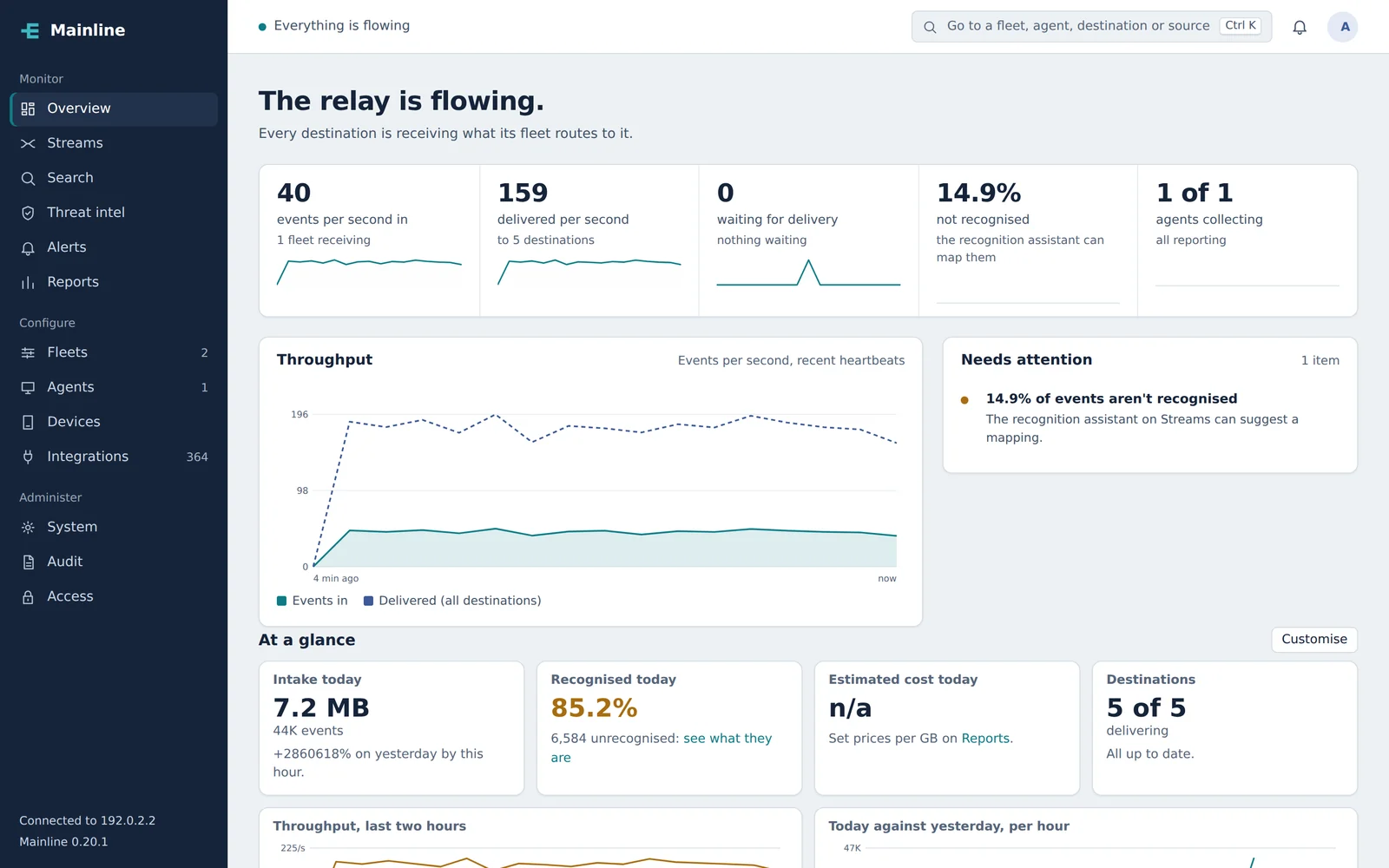
One console for every fleet
Health, throughput and what needs attention, in plain language, across every relay and agent.
Start with one source and one destination.
A pilot runs on your own servers: pick a source that matters, a destination you use, and what success looks like. We'll help you set it up.